2021/01 169

Flex 개요

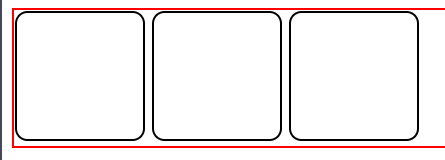
flex는 수직이나 수평 정렬에 관련된 CSS 속성이라고 보면 된다. .container{ border: 2px solid red; } .container .items{ width: 100px; height: 100px; border: 2px solid; border-radius: 10px; display: inline-block; } display: inline으로 설정하면 inline요소로 바뀌기 때문에 width와 height값이 적용되지 않는 모습을 볼 수 있기 때문에, display: inline-block으로 해야한다. 또한 문제점은 items는 inline요소가 되었기 때문에 화면에 출력된 모습을 보면 margin값을 넣지 않았는데도 서로 한칸씩 떨어져있는 모습도 볼 수 있다. 이러한걸 방지..
CSS/속성 - flex 2021.01.13

다단 (Multi Columns)

일반 블록 레이아웃을 확장하여 여러 텍스트 다단으로 쉽게 정리하며, 가독성 확보 columns 다단을 정의 값 의미 기본값 auto 브라우저가 단의 너비와 개수를 설정 auto column-width 단의 최적 너비를 설정 auto column-count 단의 개수를 설정 auto columns : 너비 개수; .text{ columns: 100px 2; } column-width 단의 최적 너비를 설정 값 의미 기본값 auto 브라우저가 단의 너비를 설정 auto 단위 px, em, cm 등 단위로 지정 column-width: 너비; 각 단이 줄어들 수 있는 최적 너비(최소 너비)를 설정하며, 요소의 너비가 가변하여 하나의 단이 최적 너비보다 줄어들 경우 단의 개수가 조정된다. column-count..

애니메이션 속성 - animation-play-state

애니메이션의 재생과 정지를 설정 값 의미 기본값 running 애니메이션을 동작 running paused 애니메이션 동작을 정지 body{ padding: 20px; } .box::before{ content:"running"; font-size: 20px; color: white; font-weight: 700; } .box{ width: 100px; height: 100px; background: tomato; border-radius: 10px; animation: size-up 3s linear infinite alternate; display: flex; justify-content: center; align-items: center; } .box:hover{ animation-play-sta..

애니메이션 속성 - animation-fill-mode

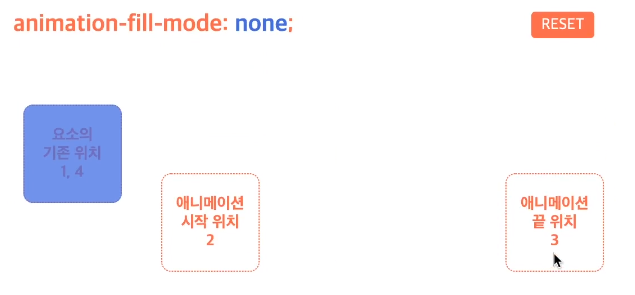
애니메이션의 전후 상태(위치)를 설정 값 의미 기본값 none 기존 위치에서 시작-> 애니메이션 시작 위치로 이동-> 동작-> 기존 위치에서 끝 none forwards 기존 위치에서 시작-> 애니메이션 시작 위치로 이동-> 동작-> 애니메이션 끝 위치에서 끝 backwards 애니메이션 시작 위치에서 시작-> 동작-> 기존 위치에서 끝 both 애니메이션 시작 위치에서 시작-> 동작-> 애니메이션 끝 위치에서 끝 .box{ width: 100px; height: 100px; background: tomato; border-radius: 10px; margin: 30px; animation: movemove 2s 2s; animation-fill-mode: both; } @keyframes movemov..

애니메이션 속성 - animation-iteration-count, animation-direction

animation-iteration-count 애니메이션의 반복 횟수를 설정 값 의미 기본값 숫자 반복 횟수를 설정 1 infinite 무한 반복 숫자를 작성하지않음 animation-direction 애니메이션의 반복 방향을 설정 값 의미 기본값 normal 정방향만 반복 normal reverse 역방향만 반복 alternate 정방향에서 역방향으로 반복(왕복) alternate-reverse 역방향에서 정방향으로 반복(왕복) **주의사항*** .box{ width: 100px; height: 100px; background: tomato; border-radius: 10px; margin:30px; animation: movemove 2s; animation-timing-function: linea..

애니메이션 속성- animation-timing-function, animation-delay (transition과 비슷함)

animation-timing-function 타이밍 함수(애니메이션 효과를 계산하는 방법) 지정 animation-delay 애니메이션의 대기 시간 설정 값 의미 기본값 시간 대기 시간을 설정 0s 음수가 허용이 된다. 음수가 있을 경우 애니메이션은 바로 시작되지만, 그 값만큼 애니메이션이 앞서 시작한다(애니메이션 주기 도중에 시작). ho .box{ width: 150px; height: 100px; border-radius: 10px; margin: 10px; color: white; font-size: 24px; display: flex; justify-content: center; align-items: center; } .box1{ background: tomato; } .box2{ backg..

애니메이션 속성- animation-name, animation-duration

animation-name @keyframes규칙(애니메이션 프레임)의 이름을 지정 값 의미 기본값 none 애니메이션을 지정하지 않음 none @keyframes 이름 이름이 일치하는 @keyframes 규칙의 애니메이션을 적용 animation-duration 애니메이션의 지속시간 설정 ms단위도 사용 가능하다. 값 의미 기본값 시간 지속 시간을 설정 0s -->지속시간이 없는 경우이다. .box { width: 100px; height: 100px; background: tomato; border-radius: 10px; } .box:hover{ animation-name: my-animation; animation-duration: 3s; } @keyframes my-animation{ 0%{ w..

keyframes rule

@keyframes 2개 이상의 애니메이션 중간 상태(프레임)을 지정 @keyframes 애니메이션이름 { 0%{속성: 값;} 50%{속성: 값;} 100%{속성: 값;} } @keyframes move-box { 0%{left: 100px;} 100%{top: 200px;} } .box { width: 100px; height: 100px; background: tomato; border-radius: 10px; } .box:hover{ animation: my-animation 3s infinite alternate; } @keyframes my-animation{ 0%{ width: 100px; background: tomato; } 75%{ width: 500px; background: dodge..

Animations 개요

요소에 애니메이션을 설정/ 제어 값 의미 기본값 animation-name @keyframes 규칙의 이름을 지정 none animation-duration 애니메이션의 지속 시간 설정 0s animation-timing-function 타이밍 함수 지정 ease animation-delay 애니메이션의 대기 시간 설정 0s aniamtion-iteratrion-count 애니메이션의 반복 횟수 설정 1 anination-direction 애니메이션의 반복 방향 설정 normal animation-fill-mode 애니메이션의 전후 상태(위치) 설정 none animation-play-state 애니메이션의 재생과 정지 설정 running animation: 애니메이션이름 지속시간 [타이밍함수 대기시간 ..

변환속성 - matrix()

matrix(a, b, c, d, e, f) 요소의 2차원 변환(Transforms)효과를 지정 scale(), skew(), translate() 그리고 rotate()를 지정 요소에 일반 변환(Transforms) 함수(2D, 3D)를 사용하더라도 브라우저에 의해 matrix 함수로 계산되어 적용된다. (2D 변환 함수는 matrix로, 3D 변환 함수는 matrix3d로) 따라서 일반적인 경우는 matrix함수가 아닌 일반 함수를 사용하면 된다.) 무슨말인지 모르겠어서 스킵했음